A product manager who’d shipped three fitness apps over six years told me something that took a while to fully appreciate. She said the feature decisions that mattered most for user retention were almost never the ones that looked most impressive in a demo. The live coaching integration that wowed investors? Meaningful but not the thing that determined whether people opened the app on day thirty. The AI-generated workout recommendations? Users liked them but didn’t cite them as reasons for staying. The thing that most consistently separated apps with strong retention from apps that people used briefly and abandoned was whether the app made it easy to see that they were making progress.
Not that they were doing workouts that they were getting somewhere.
That distinction is harder to design for than it sounds. Progress in fitness is slow, nonlinear, and often invisible from one session to the next. An app that measures and displays progress well, in ways that feel meaningful rather than clinical, is doing something that most fitness apps underinvest in because it’s less visually exciting than the features that photograph well for the app store. A thoughtful Fitness app development company building a modern fitness app understands that the features that drive retention are often different from the features that drive downloads and that building for long-term user value requires getting that distinction right before any feature list gets prioritized.
Here’s a detailed look at the features that actually matter, and what it takes to build each of them well.
Onboarding and Initial Personalization
Every fitness app begins with onboarding, and the quality of that onboarding determines whether the app earns the user’s continued attention or loses it in the first session.
The onboarding failure mode most common in fitness apps is asking for too much before delivering any value. Multi-screen questionnaires about fitness goals, experience level, available equipment, health conditions, schedule constraints, and preferred workout styles all reasonable information for building a personalized experience, all friction that stands between a new user and the moment the app demonstrates what it can do for them.
The apps that onboard well solve this by sequencing information collection over time rather than front-loading it. The first session does something useful with minimal input even a basic goal selection and fitness level assessment and gathers more nuanced information across the first several sessions as the user demonstrates they’re engaged enough to provide it. This approach produces more accurate user data, because users who’ve experienced some value are more thoughtful about the information they provide, and higher completion rates, because the friction of extensive upfront data entry doesn’t prevent users from reaching the part of the app worth staying for.
Fitness assessment as an experience rather than a form is the strongest version of this. A brief movement screen that has a user perform a few simple exercises, with the app recording and interpreting the results, collects more accurate baseline data than a self-reported fitness level selection and creates an engaging first experience rather than a data entry session. The user who’s completing a real assessment is already using the app. The user filling in a questionnaire is still in the waiting room.
Workout Programming That Actually Adapts
Static workout programs twelve weeks of predetermined exercises that every user follows in the same sequence regardless of how they’re actually progressing are the most common fitness app content model and the one most likely to produce churn in the second month, when users who progress faster than expected are bored and users who progress slower are frustrated.
Adaptive workout programming that changes based on how a user is actually responding is the feature that separates apps built for long-term retention from apps built for strong initial download numbers. The implementation range is wide: at the simpler end, an app might increase weight recommendations based on logged completion rates or adjust session length based on completion patterns. At the more sophisticated end, an app might analyze heart rate data from wearables to determine whether recovery is adequate before prescribing a high-intensity session, or adjust training split based on the muscle groups showing the most fatigue in completion patterns.
What adaptive programming requires technically is a data model that captures enough about each session not just completion but performance quality, effort rating, and any modifications made to inform subsequent programming decisions. The apps that have built this data model correctly from the start can build increasingly sophisticated adaptation logic on top of it over time. The apps that collected only binary completion data have to rebuild the foundation before adaptation becomes possible.
Exercise substitution logic is a related feature that users value significantly more than it might seem to deserve. An app that can substitute an exercise the user can’t perform because of equipment unavailability, injury, or personal preference without disrupting the programming logic of the surrounding session is doing something that coaches do naturally and that most apps handle poorly. The user who flags a knee issue and receives a substitute exercise that maintains the training intent without the problematic movement has a very different experience from the user who gets a generic “exercise unavailable” message and an alternative that happens to be in the database but may not serve the session’s purpose.
Progress Tracking That Makes Progress Visible
This is the feature the product manager was describing when she talked about the difference between tracking that workouts were happening and tracking that progress was being made. They’re not the same thing, and most fitness apps are better at the former than the latter.
Tracking that workouts happened means logging session dates, duration, exercises performed, and weights or reps. This is necessary and insufficient. A user looking at a log of forty sessions spread over three months can see that they’ve been consistent. They cannot easily see whether they’re stronger than they were, whether their endurance has improved, or whether their body composition has shifted and those are the outcomes they started exercising to achieve.
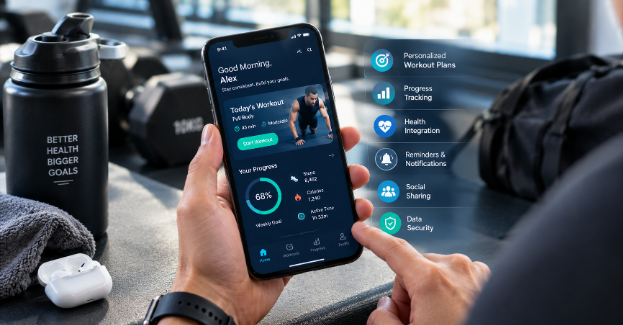
Strength progression tracking that shows trend lines across key lifts a graph that shows where a user’s squat, bench press, and deadlift have gone over time, with milestone markers when they cross personal records makes progress visible in a form that’s immediately legible and emotionally resonant. The user who can see that their squat has increased fifty pounds over six months has concrete evidence of progress that no amount of session logging provides.
Performance metrics beyond weight lifted time to complete a specific benchmark workout, resting heart rate trend, recovery score trend, estimated VO2 max progression provide a richer picture of fitness development for users whose goals extend beyond strength numbers. The endurance athlete whose pace at a given heart rate has improved consistently over twelve weeks is making progress that a workout log doesn’t capture and that a graph of heart rate versus pace over time makes immediately visible.
Before-and-after functionality has to be designed carefully to avoid producing the body image issues that poorly designed visual progress features can create, but done thoughtfully focused on performance metrics rather than appearance, emphasizing comparison to one’s own previous state rather than to external standards it represents one of the more powerful forms of progress visualization available.
Wearable Integration That’s Actually Seamless
Wearable integration is a feature that every modern fitness app includes and that most apps implement in ways that are technically functional and practically frustrating.
The functional minimum is pulling data from a wearable’s health platform steps, heart rate, sleep, workout data and displaying it in the app. This works and is table stakes. The higher standard is integration where wearable data actively informs the app’s behavior rather than simply being displayed.
Heart rate data during workouts that’s used to calibrate intensity recommendations in real time suggesting the user should lower intensity when heart rate exceeds a target zone, confirming they’re in the right zone for the session’s intent produces guidance that a app without heart rate integration can’t provide. Recovery data from overnight monitoring that adjusts the following day’s planned workout reducing planned intensity when HRV suggests inadequate recovery, or recommending active recovery rather than the scheduled high-intensity session provides the physiological responsiveness that distinguishes personalization from population-based programming.
The integration challenge is the fragmentation of the wearable ecosystem. Accurate heart rate from a Garmin, sleep data from a Whoop, workout records from an Apple Watch different users have different device combinations, and an app that works seamlessly with one wearable platform and poorly with others has adoption constraints that reflect the platform’s device coverage rather than its quality. Supporting the major platforms with genuine depth HealthKit for Apple Watch, Google Fit for Android wearables, and direct SDK integration with the most common third-party devices requires meaningful development investment that shows up in the experience quality for users who bring their existing devices to the app.
Community and Social Features That Enhance Rather Than Distract
The social features in fitness apps have a difficult design constraint: the research on motivation consistently shows that social accountability improves exercise adherence, and the research on social comparison consistently shows that performance comparison demotivates the users who most need motivation.
The resolution to this constraint is designing for shared commitment rather than comparative performance. Challenges that celebrate participation rather than ranking where everyone who completed the challenge is recognized equally regardless of performance level motivate without the discouragement that performance leaderboards produce for users who are not the fastest or strongest in any group they’re likely to be placed in.
Accountability features that connect users with their social circle rather than with strangers produce stronger motivational effects for most users than platform-wide leaderboards. The friend whose activity is visible in a shared feed, the training partner whose check-in notifications arrive at a scheduled time, the small group pursuing a shared goal on a shared timeline these social configurations produce accountability that global platform rankings don’t.
Coach-to-athlete communication, where professionals can monitor client activity within the app and provide feedback on the data they’re generating, represents the premium end of community functionality and the feature that creates the strongest retention for users with that relationship structure. The athlete who knows their coach sees their session data, who receives a message when a session shows an unusual pattern, and who can ask questions and receive answers within the context of their training history is in a supported training relationship that the app mediates but doesn’t replace.
Nutrition Features Done Honestly
Nutrition tracking is the feature most fitness apps include and most fitness app users abandon within two weeks because comprehensive food logging requires sustained effort that most users aren’t willing to maintain and that the research suggests produces anxiety in some users that outweighs the benefit of the data.
The honest approach to nutrition features in a fitness app starts with asking whether comprehensive nutrition tracking is what your specific user base actually needs, which for many fitness app user populations it isn’t. For apps focused on general fitness and health rather than competitive bodybuilding or clinical weight management, lightweight nutrition awareness features produce better outcomes than comprehensive tracking: hydration reminders calibrated to training load, macro guidance for training days versus rest days without requiring precise logging, and meal timing suggestions that support workout performance without demanding dietary perfection.
Where comprehensive tracking is appropriate for users explicitly pursuing precise nutrition management the friction of data entry needs to be minimized to the point where consistent use is achievable. AI-powered food recognition from photos, barcode scanning with extensive food databases, restaurant meal estimation, and recipe import from external sources are all tools that reduce the manual work of logging enough that consistent use becomes realistic for users who are genuinely committed to the feature.
What Building These Features Actually Costs
When evaluating Fitness App Development Cost for a feature set of this depth, the range is wide and the variables that drive it are specific.
An MVP with adaptive programming, solid progress tracking, basic wearable integration with HealthKit and Google Fit, and foundational community features can be built for $120,000 to $250,000 with a capable team. A platform that adds deep multi-wearable integration, sophisticated recovery-based adaptation logic, coach-athlete communication infrastructure, and nutrition features beyond basic guidance runs $300,000 to $600,000 for a production-quality implementation. The range reflects real engineering complexity the adaptation logic that uses physiological data to adjust programming is substantially harder to build than the programming delivery mechanism it modifies.
The feature decisions that drive cost most significantly are wearable integration breadth, the sophistication of the adaptation algorithm, and the depth of the coach-client functionality. Each of these represents a distinct technical system with its own data model, integration surface, and ongoing maintenance requirements. Scoping them realistically before committing to a build prevents the mid-project discoveries that expand timelines and budgets past what was planned.
Back to the Product Manager’s Insight
The features that make users open the app on day thirty aren’t always the ones that made them download it. The progress visualization that shows forty-five pounds added to a squat over six months isn’t exciting to describe in an app store listing. The adaptive programming that reduced planned intensity on a Tuesday when HRV data suggested it was warranted isn’t a headline feature in a product announcement. The recovery-integrated wearable integration that quietly adjusted a week of training because sleep data suggested accumulating fatigue is the kind of thing users notice when it’s working and don’t articulate until something asks them why they’ve stayed with an app this long.
Building for these features investing in progress visibility, adaptation quality, and wearable integration depth over the more photographable features that drive early attention is building for the users who stay rather than the users who download. In a category with app store screens full of products competing for initial attention, the apps that build for day thirty are the ones that have retention numbers worth being proud of and the word-of-mouth that makes the download acquisition cost sustainable.
That’s what building features for a modern fitness app actually requires. Not the most impressive list the right list, built with enough depth that it actually does what it promises.